I regularly use UniGetUI to update programs that I have installed on Windows, now I can do the same for Windows Updates (using the PSWindowsUpdate) and I have now found that I don’t have to open Microsoft Store to update store installed apps, I can also do that with a command.
Store
There are two different ways to install programs on Windows, the traditional method was to insert a CD or DVD into the drive, although these days you would download it from a website on the Internet. You’d then run an installer and that would do everything for you.
The second method is to “get” an app from the Microsoft (app) Store. These can be free, or you may need to pay for them. You can then install them on your computer from the store.
Store CLI
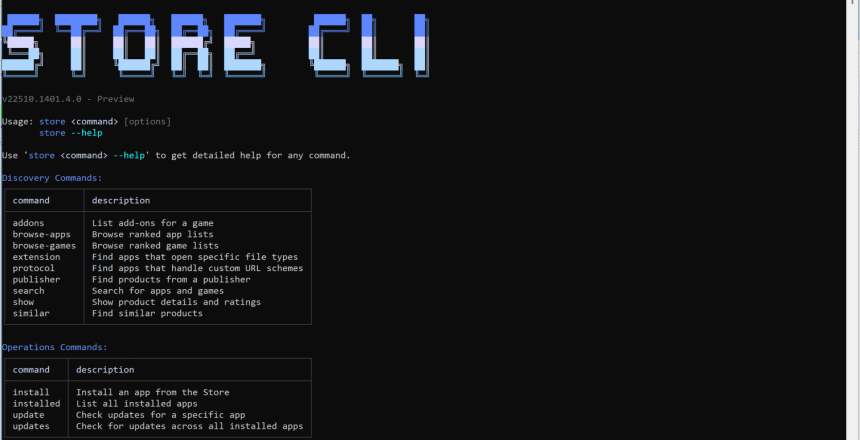
Store CLI (Command Line Interface) does the same thing as the Store app does, but instead of clicking multiple buttons to get where you need to go, you type a command.
Open a PowerShell (Win+X and choose Windows PowerShell) then type store to view the command that are available to you.
The command I use the most is store updates, which updates all the installed apps.
A lot of the commands require additional parameters, such as store browse-apps requires top-free, top-paid, new-and-trending, most-popular, or most-trending parameters.
