Skip to content
John The Computer Man

Do you have computer problems?

  • Computer Repair
  • About
  • Testimonials
  • Blog
  • Contact
  • Computer Repair
  • About
  • Testimonials
  • Blog
  • Contact
Facebook Instagram Envelope
  • 01424 390 079
  • 07966 151186
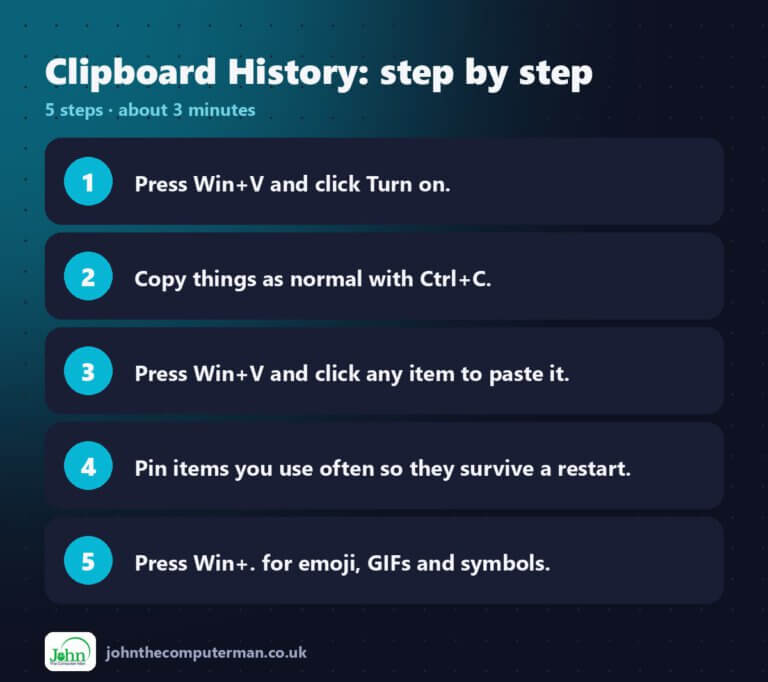
Clipboard History step by step: 5 steps

How to Use Clipboard History in Windows 11 (Win + V Explained)

Normally, when you copy something, it replaces whatever you copied before. Clipboard history changes that. Windows 11 keeps a list of your recent copies, so

Read More »
How to use Flash fill in Excel

How to Use Flash Fill in Excel (Ctrl + E)

Flash Fill is the closest thing Excel has to mind reading. You show it one example of what you want, press Ctrl + E, and

Read More »
AI coding agents for developers

90% of Developers Now Code With AI Agents

If you want to see where agentic AI has gone furthest, look at software development. Coding is text, it’s testable, and developers are early adopters,
Read More »
How to insert a table in Word

How to Insert a Table in Word (and Make It Look Good)

Tables are the easiest way to line up information in Word — price lists, timetables, contact lists, comparison charts. Here’s how to create one, tweak

Read More »
John The Computer Man

John Crowhurst Proprietor t/a John the Computer Man
18 Cavendish Avenue
St Leonards on Sea TN38 0NR

Where I cover: 20 mile radius from Hastings (St Leonards, Battle, Bexhill, Rye, Eastbourne)

Hours: 9:00am – 5:00pm

Hourly rate: £60 per hour

Navigation

  • Home
  • About
  • Testimonials
  • Blog
  • Contact
  • Privacy Policy
  • Terms & Conditions
Cleantalk Pixel