Skip to content
John The Computer Man

Do you have computer problems?

  • Computer Repair
  • About
  • Testimonials
  • Blog
  • Contact
  • Computer Repair
  • About
  • Testimonials
  • Blog
  • Contact
Facebook Instagram Envelope
  • 01424 390 079
  • 07966 151186
Dark Mode: Set up Dark mode and Night light on Windows 11

How to Turn On Dark Mode and Night Light in Windows 11

Bright white screens can be harsh, especially in the evening. Windows 11 has two built-in features that make your screen easier on the eyes: Dark

Read More »
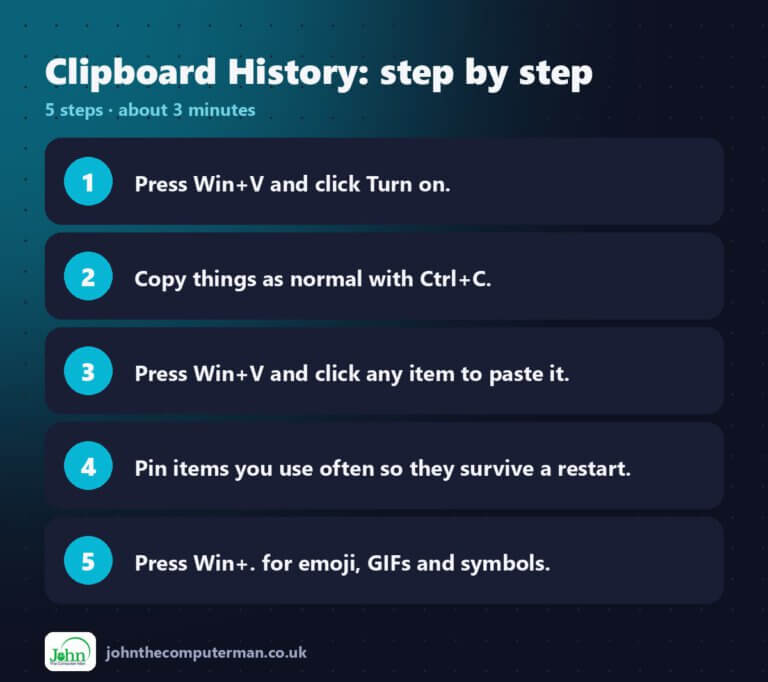
Clipboard History step by step: 5 steps

How to Use Clipboard History in Windows 11 (Win + V Explained)

Normally, when you copy something, it replaces whatever you copied before. Clipboard history changes that. Windows 11 keeps a list of your recent copies, so
Read More »
File Explorer Tips: 10 tips to find and manage files faster

10 File Explorer Tips for Windows 11 Everyone Should Know

File Explorer is the app you use to find, open and organise your files. You probably use it every day, but most people only scratch
Read More »
12 Shortcuts: Windows 11 keyboard shortcuts that save hours

12 Windows 11 Keyboard Shortcuts That Save Hours

You don’t need to learn hundreds of shortcuts. A dozen well-chosen ones will save you time every day. Here are the Windows 11 shortcuts I
Read More »
PC Specs: Find your processor, RAM, graphics and more

How to Find Your PC’s Specs in Windows 11 (Processor, RAM, Graphics and More)

“What processor have you got?” “How much RAM?” “Which version of Windows?” Sooner or later, a support person, a game, or a website you’re selling

Read More »
John The Computer Man

John Crowhurst Proprietor t/a John the Computer Man
18 Cavendish Avenue
St Leonards on Sea TN38 0NR

Where I cover: 20 mile radius from Hastings (St Leonards, Battle, Bexhill, Rye, Eastbourne)

Hours: 9:00am – 5:00pm

Hourly rate: £60 per hour

Navigation

  • Home
  • About
  • Testimonials
  • Blog
  • Contact
  • Privacy Policy
  • Terms & Conditions
Cleantalk Pixel